Supported file types for upload
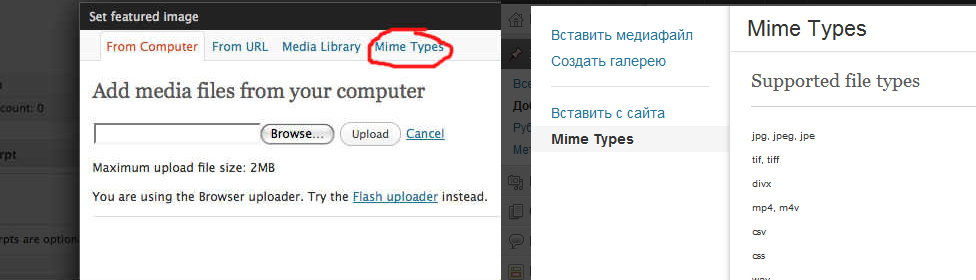
This code will add a new tab, which will display all supported file types. The list of supported types can be easily modified by adding a special filter.
Sample code for forming a tab:
function mime_type_tab($tabs) {
        /* name of custom tab */
        $new_tab = array('mimeframe' => __('Mime Types', 'mimetype'));
        return array_merge($tabs, $new_tab);
}
add_filter('media_upload_tabs', 'mime_type_tab');
function create_mime_type_page() {
        media_upload_header();
        wp_enqueue_style( 'media' );
        /* add custom code to display bellow this line */
        /* display mime types */
        $mimes = get_allowed_mime_types();
        $types = array();
        echo '<div class="type-outer">';
        echo '<h3 class="media-title">Supported file types</h3>';
        echo '<hr />';
        foreach ($mimes as $ext => $mime) {
                 $types[] = '<li>' . str_replace('|', ', ', $ext) . '</li>';
        }
        echo '<ul class="mime-types">' . implode('', $types) . '</ul>';
        echo '</div>';
       /* end custom code */
}
function insert_mime_type_iframe() {
    return wp_iframe( 'create_mime_type_page');
}
add_action('media_upload_mimeframe', 'insert_mime_type_iframe');
        add_action( 'admin_head', 'mime_frame_css' );
        function mime_frame_css() {
                echo '<style type="text/css">
                .type-outer{margin:20px;}
                .type-outer hr{
                        border:solid #ccc;
                        border-width:0px 0px 1px 0px;
                        margin:0px 0px 20px 0px;
                        }
                .mime-types li{
                        font-size:10px;
                        float:left;
                        width:24%;
                        padding:1px;
                        }
                        </style>';
        }
Snapshot of the resulting tab
Another Useful WordPress Code Snippet
Among other things, I found another useful code, which can in the settings of the plugin you create, withdraw which types are supported by WordPress at the moment to download files.
Code Example:
     $mimes = get_allowed_mime_types();
     $types = array();
foreach ($mimes as $ext => $mime) {
     $types[] = '<li>' . str_replace('|', ', ', $ext) . '</li>';
}
     echo '<ul>' . implode('', $types) . '</ul>';
I checked everything and everything works. Good luck with development!

/*

Online tutoring services. List of courses I teach
*/- Basic web design course;
- Site layout;
- General course on CMS WordPress and continuation of the course on template development;
- Website development in PHP.